HW: Working with Lists (For Loops)
Purpose: This assignment aims to test your ability to use for loops for analyzing lists.
Getting Started
Create a copy of the starter sheet here: 
Rename it something like "(Your_Name)_HW_For_Loops.ipynb".
You will work with a list of beams and use for loops to calculate and print the deflection of the beams. Assume that they are cantilevered with a point load at some distance a from the fixed end on the left as shown in the following diagram.
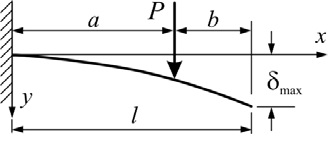
The deflection at the end of the beam is given by the following equation:
\(\delta_{max}=\dfrac{Pa^2}{6EI}\left(3l-a\right)\)
where:
\(\delta_{max}\) = the maximum deflection at the end of the beam
\(P\) = the point load [\(mass\)]
\(a\) = the distance from the fixed side to the point load [\(length\)]
\(l\) = the length of the beam [\(length\)]
\(E\) = the modulus of elasticity [\(force/length^2\)]
\(I\) = the moment of inertia [\(length^4\)]
The modulus of elasticity is a measure of the stiffness of the beam. The moment of inertia of a beam depends on its dimensions and cross-sectional properties. Here are some approximate moments of inertia for common I-beams:
| Beam Type | Moment of Inertia (\(I\)) |
|---|---|
| W6x12 | 140 \(cm^4\) |
| W8x31 | 1,260 \(cm^4\) |
| W12x50 | 4,800 \(cm^4\) |
| W18x86 | 17,200 \(cm^4\) |
| W24x162 | 66,000 \(cm^4\) |
For multiple loads, the total deflection is the sum of the deflections due to each individual load. For this assignment, you will analyze a list of beams and calculate the deflection of each beam. For each beam, you will calculate the total deflection due to multiple loads using the equation above. We will assume that we have a steel beam with the following properties:
| Property | Value |
|---|---|
| \(E\) | 20e6 \(N/cm^2\) |
| \(I\) | 4,800 \(cm^4\) |
Part 1 - Looping over beam lengths
-
Run Code Block 1 to create a list of beam lengths in centimeters.
-
In Code Block 2, append a value of 570 to the beam_lengths list.
-
Create a variable to store the value of the total length of all beams. Also create a for loop to calculate the total length of all the beams using the variable. After the loop finishes, print the total length you find. This should be done in Code Block 3.
-
Calculate the average length of the beams and print the result. This should be done in Code Block 4.
Part 2 - Calculating beam deflections
-
Run Code Block 5 to create the 'beam_lengths' list.
-
In Code Block 6, delete the last length from the list and then display the contents of the list.
-
In Code Block 7, you will find the given values for E, I, and the loads for the steel beam. Run this cell to initialize the variables and the list.
-
Finally, in Code Block 8, calculate the total deflection of the beam using the set of loads in the loads list for each beam length. To do this, you will need to loop over the beam lengths and then loop over the loads in a nested loop. Create a variable for the total deflection and set it to zero at the beginning of the outer loop, then add to this variable in the inner loop to add up the total deflection for that beam length. As you complete the outer loop for each beam length, print the beam length and the total deflection.
Turning in/Rubric
REMINDER - For this class, you will only turn in the links to your colab notebooks. You will get a 0 for this assignment if you turn in a python file or a link that is not correct, wrong assignment, or does not give editor permission.
Rubric:
| Lists | Points Possible |
|---|---|
| In the 1st code block, a value of 570 is appended to the beam_lengths list | 2 |
| Variable created to store the value of total length of the beam | 2 |
| For loop created to calculate the total length of the beam | 5 |
| Average length of the beams is calculated | 2 |
| Print statements created to output the results | 2 |
| In the 2nd code block, the last length in the list is deleted | 2 |
| A variable is created to store the deflection of the beam | 2 |
| For loop is created to calculate the deflection of each beam | 5 |
| Print statements created that specify the length of the beam and the total deflection | 3 |
| Comments are used to separate different sections of the code and explain what the code is doing | 5 |
Total |
30 |
The following is not a part of the rubric, but specifies how you can lose points. For example: if you do not explain your code when using AI to help you create it or fail to share your link correctly.
| Reasons for Points Lost | Amount |
|---|---|
| Link shared incorrectly | -10% |
| Turned in late (per week) | -10% (up to -50%) |
| No comments explaining where AI is used and what its provided code does | -50% |