HW: IF Statements
Purpose: This assignment aims to test your ability to use IF, ELIF, and ELSE statements to analyze inputs and lists to determine a desired result. It also provides practice using IF statements with for loops and lists.
Getting Started
Create a copy of the starter sheet here: 
Rename it something like "(Your_Name)_HW_If_Statements.ipynb".
Part 1 - Truss Determinacy Solver
Objective: Create code that can solve the determinacy of any given truss when given the correct inputs. Determinacy is a Statics principle that helps us know whether we can solve the forces in a given system using statics equations.
Here is an example of a truss. The blue lines are the members, the joints are the white circles where the members meet, and the red arrows are the reaction forces:
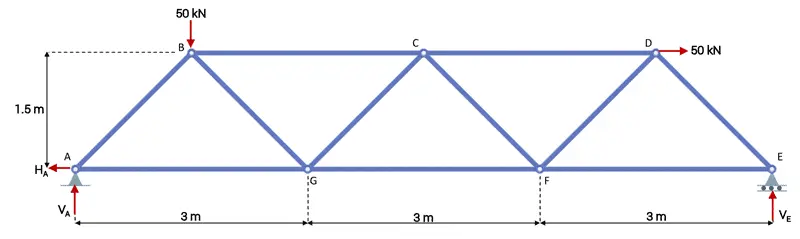
(image from www.engineeringskills.com)
For this example, a student has given you a list of trusses he needs to solve for in his statics class. Because of your charitable heart, and your superb coding skills, you have agreed to help him.
-
Navigate to the "Part 1 - Truss Determinacy Solver" section. In the first code block, create 3 different input statements using colab forms to ask the user for the following:
- The number of joints in the truss. (Must be an integer)
- The number of members in the truss. (Must be an integer)
- The number of reaction forces acting on the truss. (Must be an integer)
-
Write IF, ELIF, and ELSE statements on the same code block for the following scenarios. Divide the section using a comment.
| Equation | Result |
|---|---|
| # of members + # of reaction forces = 2 * (# of joints) | Statically determinate |
| # of members + # of reaction forces > 2 * (# of joints) | Statically Indeterminate |
| # of members + # of reaction forces < 2 * (# of joints) | Unstable |
-
Finally write a print statement to print the result in the same code block. Divide this code using comments. For example, if my truss had more joints than reaction forces + my members, then the code would print "truss is statically unstable"
-
Test your code with the following scenarios:
| Scenario # | Joints | Members | Reaction Forces | Result |
|---|---|---|---|---|
| 1 | 3 | 3 | 3 | Statically determinate |
| 2 | 4 | 6 | 3 | Statically indeterminate |
| 3 | 8 | 9 | 4 | Unstable |
Part 2 - Material Order Counter
Objective: You are helping a company count the orders of materials it has. They have given you the list and want you to count it.
-
Navigate to the "Part 2 - Material Order Counter" section. Below the "Total_order" list, create a for loop that will go through each order in the given "orders" list. Divide this code using comments.
-
In the next line, create a for loop that will read each item in the "Total_order" list.
-
Now, create a 3rd loop that loops through the totals if the material from the "order" list is equal to the item in the "Total_order" list, then add 1 to the item total.
- EX: If steel is in the "order" list and "total_orders" list, then the value for steel in the "total_orders" list should increase by 1 for each occurrence of steel. This should be the same for wood and brick.
-
Write a loop to print each of the final values for wood, brick, steel, glass, and concrete. Divide this code using comments. Here are the final values that you should get:
- 14 orders of wood
- 10 orders of brick
- 8 orders of steel
- 12 orders of glass
- 6 orders of concrete
Turning in/Rubric
REMINDER - For this class, you will only turn in the links to your colab notebooks. You will get a 0 for this assignment if you turn in a python file or a link that is not correct, wrong assignment, or does not give editor permission.
Rubric:
| If Statements | Points Possible |
|---|---|
| Part 1 - Correct value for scenario 1 | 5 |
| Part 1 - Correct value for scenario 2 | 5 |
| Part 1 - Correct value for scenario 3 | 5 |
| Comments explaining code for Part 1 | 3 |
| Part 2 - Correct value for wood | 3 |
| Part 2 - Correct value for steel | 3 |
| Part 2 - Correct value for brick | 3 |
| Part 2 - Correct value for glass | 3 |
| Part 2 - Correct value for concrete | 3 |
| Comments explaining code for Part 2 | 3 |
Total |
36 |
The following is not a part of the rubric, but specifies how you can lose points. For example: if you do not explain your code when using AI to help you create it or fail to share your link correctly.
| Reasons for Points Lost | Amount |
|---|---|
| Link shared incorrectly | -10% |
| Turned in late (per week) | -10% (up to -50%) |
| No comments explaining where AI is used and what its provided code does | -50% |