Reading: Functions and Files
Pre Class Reading Assignment
On the W3Schools website, read the Python Tutorial chapter on Python Functions. Here is a direct link to the reading: W3Schools: Python Functions.
Make sure you click through all the function subtopics on the W3Schools website (there are 8 of them).
We suggest you re-read the chapter on Python Functions in the Python Crash Course, 3rd Edition textbook. It will help understand the W3School discussion. Here is a direct link to the previous reading: PCC Chapter 8: Functions.
Also read the Files section below.
Things to Look Out For
- Python functions take inputs (parameters), process them, and return outputs (return values).
- Functions let you reuse code by calling the same block multiple times.
- Parameters are placeholders in function definitions; arguments are actual values passed during function calls.
- Functions can take many arguments; if the number is uncertain, use flexible syntax (args, *kwargs).
- You can pass arguments by position or with key = value, and even pass lists to functions.
- Recursion occurs when a function calls itself; modules let you import and reuse python code across programs.
Files
This section will introduce you to file handling in Python. You will learn how to read from and write to files, which is essential for data persistence and manipulation.
Chapter 10 of the Python Crash Course, 3rd Edition textbook covers file handling in Python. You can read the chapter here: PCC Chapter 10: Files and Exceptions.
Opening a File
To read or open a file in Python, you can use the built-in open() function. The open() function takes two arguments: the name of the file and the mode in which you want to open the file. The most common modes are:
- 'r': Read mode (default). Opens the file for reading.
- 'w': Write mode. Opens the file for writing (creates a new file or truncates an existing file).
- 'a': Append mode. Opens the file for appending (creates a new file if it doesn't exist).
There are two main ways that you can open and close a file in Python:
- Using the
open()function without a context manager, which requires you to manually close the file using theclose()method. - Using the
open()function with a context manager (withstatement), which automatically closes the file when you're done with it.
Without Using a Context Manager
file = open('example.txt', 'r')
content = file.read()
print(content)
file.close()
In this example, the file example.txt is opened in read mode. You must remember to call file.close() to close the file after you're done with it. If you forget to close the file, it can lead to resource leaks and other issues.
Using a Context Manager
with open('example.txt', 'r') as file:
    content = file.read()
    print(content)
In this example, the file example.txt is opened in read mode. The with statement ensures that the file is properly closed after its suite finishes, even if an exception is raised. This method is preferred for file handling in Python because it is cleaner and less error-prone (you're less likely to forget to close the file).
Reading a file
Reading a Python file means that you are accessing the contents of the file and loading it into your program so that you can manipulate or analyze the data. Note: When you read a file (the -r option), you are not modifying the file itself, you are simply accessing its contents. This is especially useful when working with large datasets or text files, as it allows you to process the data without having to load the entire file into memory at once. You can read in the entire file (like the examples in the Context manager section), or you can read in things line by line.
with open('example.txt', 'r') as file:
    for line in file:
        print(line.strip())
In this example, the file example.txt is opened in read mode. The for loop iterates over each line in the file, and the strip() method is used to remove any leading or trailing whitespace (including newline characters) before printing the line.
Writing to a File
To write to a file in Python, you can use the open() function with the 'w' or 'a' mode.
with open('output.txt', 'w') as file:
    file.write('Hello, World!\n')
    file.write('This is a new line.\n')
In this example, the file output.txt is opened in write mode. If the file already exists, it will be truncated (emptied). If it doesn't exist, a new file will be created. The write() method is used to write strings to the file.
Appending to a File
with open('output.txt', 'a') as file:
    file.write('This line is appended.\n')
In this example, the file output.txt is opened in append mode. If the file doesn't exist, a new file will be created. The write() method is used to append strings to the end of the file. The \n character is used to create a new line after each write. This is useful when you want to add new data to an existing file without overwriting the current contents.
Pre-Class Quiz Challenge
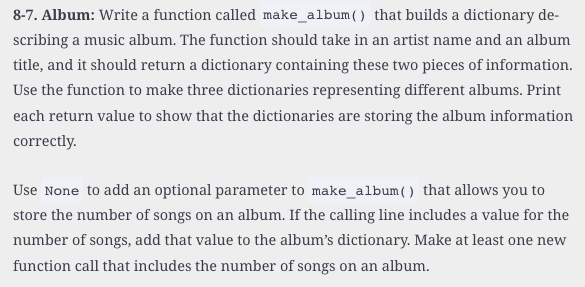
In a Colab notebook, complete Problem 8-7 found in chapter 8 of the textbook. Submit a link to the completed problem in your Pre-Class Quiz.
Turning in/Rubric
REMINDER - For this class, you will only turn in the links to your colab notebooks. You will get a 0 for this assignment if you turn in a python file or a link that is not correct, wrong assignment, or does not give editor permission.
Rubric:
| Item | Points Possible |
|---|---|
Total |
3 |
The following is not a part of the rubric, but specifies how you can lose points. For example: if you fail to share your link correctly.
| Reasons for Points Lost | Amount |
|---|---|
| Link shared incorrectly | -10% |