Reading: Introduction to Classes
Pre Class Reading Assignment
On the O'Reilly's website read chapter 9 in Python Crash Course, 3rd Edition. Here is a direct link to the readings: PCC Chapter 9: Classes.
Remember that you will have to sign in to your free account that you created earlier.
Things to Look Out For
- A class is like a template or plan that defines how objects should be created
- Creating a class allows you to define an object once and then create many similar objects from it
- A class describes the data (attributes) an object will have and the actions (methods) it can perform
- Defining a class is not the same as using it — you must create an object from the class to use it
Dunder methods (magic methods)
Dunder methods (short for "double-underscore" methods, also called magic methods) let you customize how your objects behave with Python's built-in operations.
The most common dunder method is the __init__ (constructor).
Every class can define an __init__ method (the initializer) which Python calls automatically when you create a new instance. Use __init__(self, ...) to accept parameters and assign attributes on self so each object starts with the right state. If you don't define __init__, Python provides a default initializer that takes no extra arguments.
Two other common methods are __repr__ (developer-friendly representation), and __str__ (user-friendly string representation).
- __str__ controls what is returned when you call str(obj) or print(obj). It's meant to be readable for end users.
- __repr__ should return an unambiguous string that, if possible, could be used to recreate the object and is intended for developers/debugging.
For the in-class and the HW, the __str__ method is useful for printing objects in a nice format. We ask you to print out a representation of your objects in the HW, and __str__ is a good way to do that.
Small example:
class Person:
    def __init__(self, name, age):
        self.name = name
        self.age = age

    def __repr__(self):
        return f"Person(name={self.name!r}, age={self.age!r})"

    def __str__(self):
        return f"{self.name}, age {self.age}"

p = Person('Aisha', 21)
print(p)        # Uses __str__: "Aisha, age 21"

# note that print() calls str() on the object, which in turn calls __str__
# which is why we get the user-friendly string representation.
# If we just call str(p) it will also use __str__ and give us the same output.

repr(p)         # Uses __repr__: "Person(name='Aisha', age=21)"
# In this case we use repr() which calls __repr__ and gives us the developer-friendly representation.
# This is often more detailed and includes the class name and the attributes, which can be useful for debugging.
(You don't need to memorize every dunder method, but being familiar with init, str, and repr is useful.)
Pre-Class Quiz Challenge
In a Colab notebook, complete Problem 9-3 and 9-5 found in chapter 9 of the textbook. Be sure to create and run several instances to test your class. Submit a link to the completed problem in your Pre-Class Quiz.
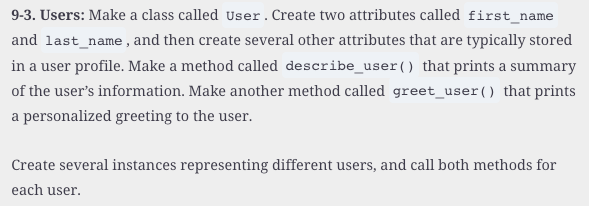
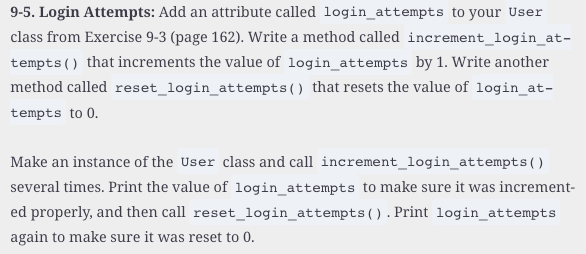
If you have time and want to practice more, you can also complete Problem 9-7 and 9-8.
Turning in/Rubric
REMINDER - For this class, you will only turn in the links to your colab notebooks. You will get a 0 for this assignment if you turn in a python file or a link that is not correct, wrong assignment, or does not give editor permission.
Rubric:
| Item | Points Possible |
|---|---|
Total |
3 |
The following is not a part of the rubric, but specifies how you can lose points. For example: if you fail to share your link correctly.
| Reasons for Points Lost | Amount |
|---|---|
| Link shared incorrectly | -10% |